Mac Document File Converter is a powerful and versatile tool designed to help Mac users seamlessly convert various document formats in bulk.
Free Demo - Mac Document Converter Tool Fully Secured Download Version
Extensive Documents Support
One Utility for All Mac Document File Conversion. Supports 60+ Document Types including Word, Excel & Coding Files.
List of Supported File Types
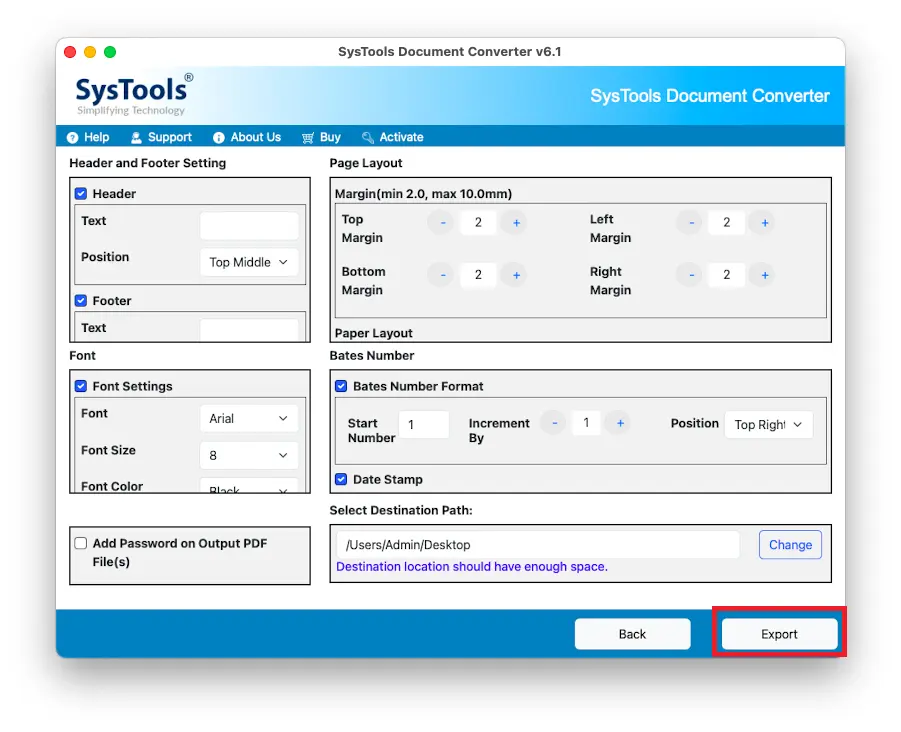
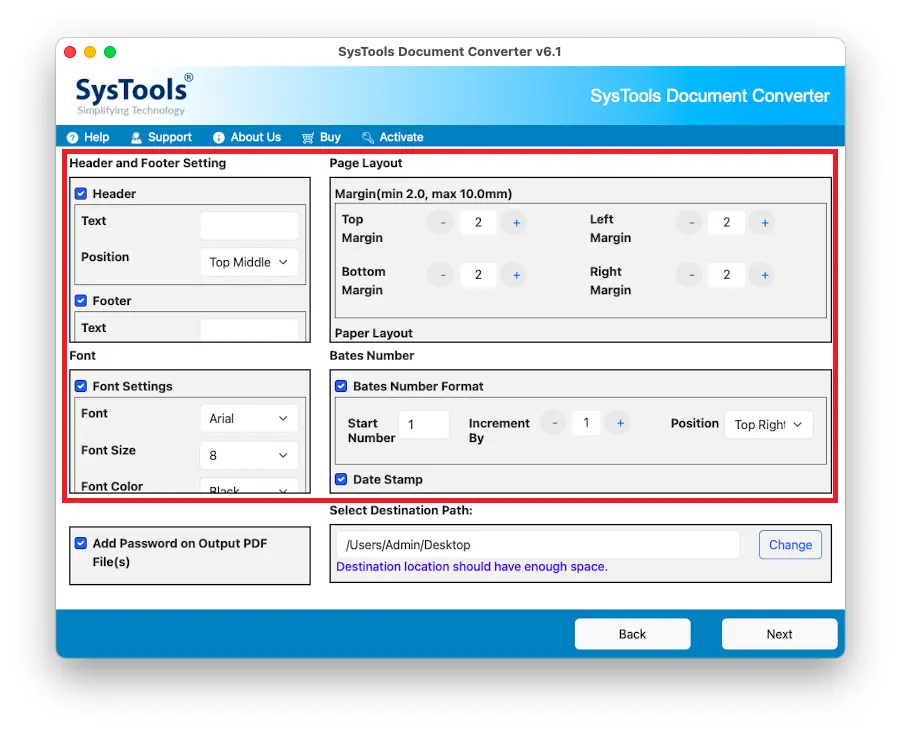
PDF Customization Options
Mac Document Converter provides advanced customization features for PDF output. Users can:
Read Some Optimal Features of This Pro Utility for Exporting Files Smoothly
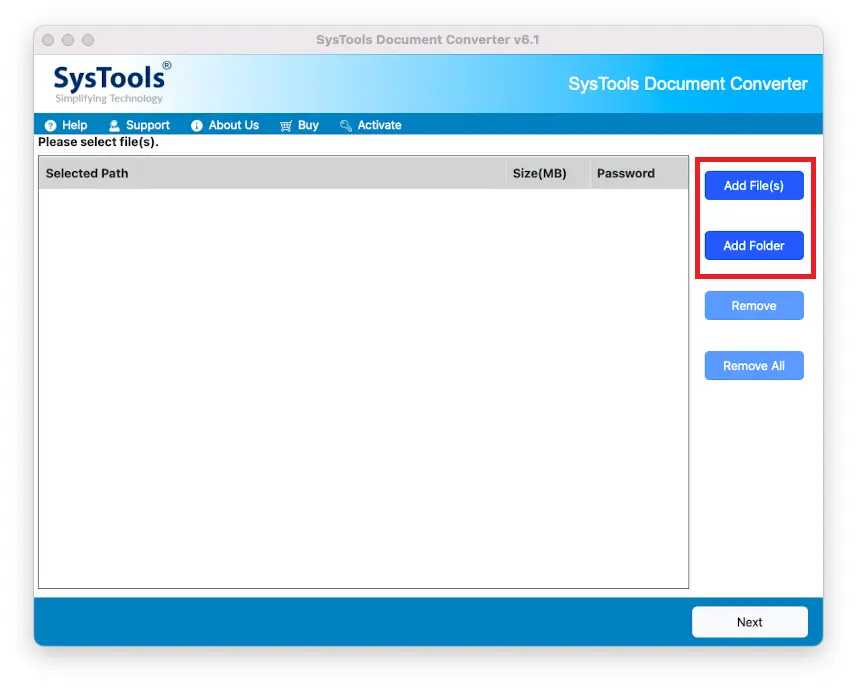
Save time and effort by converting multiple file types simultaneously. This Mac document converter efficiently processes DOCX, TXT, PDF, and other formats in bulk, ensuring a hassle-free experience. No need to convert each file individually—just select the documents and let the software do the rest!
Convert documents of various formats, including DOCX, XLSX, and more. The software supports a wide range of input and output formats, making it a highly versatile Mac file converter for all document needs.
Ensures that fonts, layouts, tables, and images remain intact post-conversion. Users can be confident that their converted files will look exactly like the original documents.
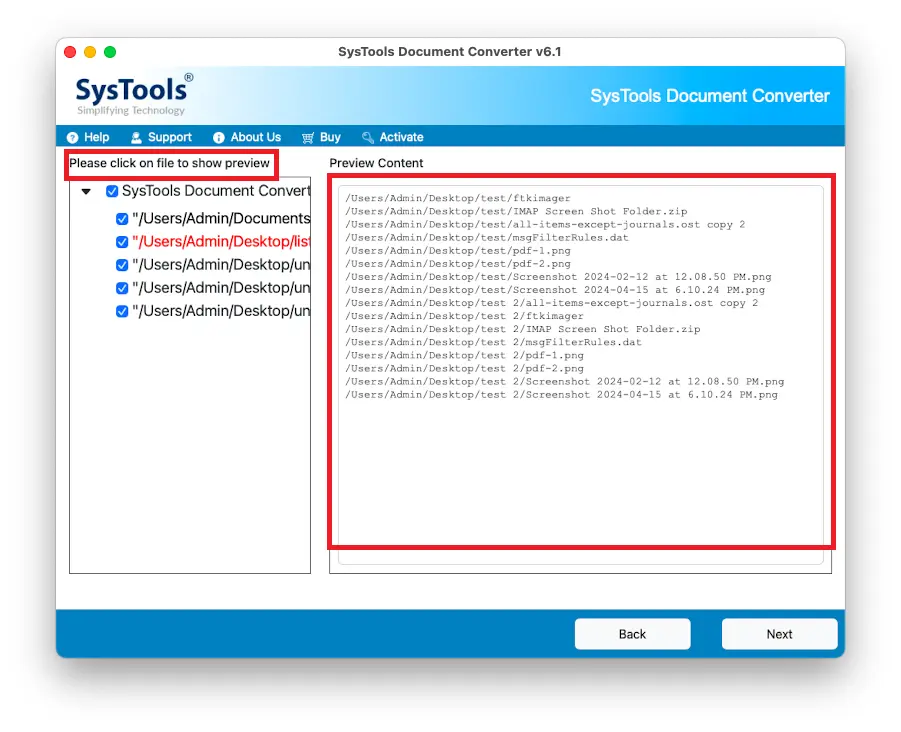
Check document content before finalizing the conversion process. This feature allows users to verify accuracy and make any necessary adjustments before proceeding.
Handle extensive document batches without performance issues. Whether converting a few files or thousands, the tool efficiently processes them without lag or crashes.
100% offline tool ensures privacy and data security. No internet connection is required, ensuring that sensitive documents are not exposed to potential cyber threats.
Users can filter and select specific documents for conversion instead of processing an entire folder. This helps streamline the process and avoid unnecessary file conversions.
This software works seamlessly on all macOS versions, including the latest macOS updates. Users don’t have to worry about compatibility issues.
Key Parameter of Software to Launch File Converter on Your Mac System
Trial Limitations
Limitations
Mac Document converter tool free demo version enables you to export only 5 items per folder.
System Specifications
Hard Disk Space
200 MB of free hard disk space required
RAM
4 GB of RAM is required
Processor
Mac Computer with Intel Processor
Mac Computer with Apple Silicon Chip M Series
Pre-Requisites
Java JDK & JRE 8 should be installed in the system.
Operating System
Mac OS X 10.8 (Mountain Lion), Mac OS X 10.9(Mavericks), Mac OS X 10.10 (Yosemite), Mac OS X 10.11 (El Capitan), Mac OS X 10.12 (Sierra), Mac OS X 10.13 (High Sierra), Mac OS X 10.14 (Mojave), Mac OS X 10.15 (Catalina), Mac OS X 11.0 (Big Sur), Mac OS X 12.0 (Monterey), MacOS X 13.0 (Ventura), MacOS X 14.0 (Sonoma).
Discover Which One is Fulfill Your Need? Free Vs Full Version
| Features | Free Version | Full Version |
|---|---|---|
| Convert Multiple File Types | ||
| Batch Document Conversion | ||
| PDF Customization Options | ||
| Retains Original Formatting | ||
| Launch on Mac OS 10.8, 10.9 & Above Versions | ||
| Conversion Limit | 5 Files/ Folder | All Files |
| Cost | FREE | $29 |
Read the Users Queries of Related to Mac Document Converter Wizard
Here are the steps to export files to the required file format:-
Yes, With its advanced features, batch processing, and multiple format support, it stands out as one of the best document converters for Mac..
Yes, it can generate password-protected PDFs, provided you enter the password behorehand.
Absolutely! This software runs entirely offline, ensuring data security and privacy.
Absolutely! The batch processing feature allows you to convert multiple documents of different formats simultaneously.
Words of Clients on The Full Version of This Tool
“Mac Document Converter is a lifesaver! The batch conversion feature saved me hours of work"
Troy Stuat
Berlin
"I love the PDF customization options. Being able to secure my documents with passwords is a great feature"
Albert Fred
Germany
"I’ve tried several tools to convert documents on Mac, but this one stands out. The batch processing feature saves me so much time, and the output quality is excellent”
Shawn Walter
Denmark
“The Mac Document Converter is a lifesaver! It’s fast, easy to use, and preserves the formatting perfectly. Highly recommend it to anyone looking for a reliable Mac file converter.”
Steve Adams
USA
“This is hands down the best document converter for Mac. It supports all the file types I need, and the customization options are fantastic."
Henry Hart
Canada
“The best document converter for Mac! It retains formatting perfectly and works flawlessly"
Samuel Taylor
Spain
Why Choose MACWARETOOLS?
2M+
Happy Clients
15+
Products
80+
Countries
5+
Years of Experience