MacWareTools EML to PST ConverterFor Bulk Mac EML Files
Convert EML to PST on Mac with desktop EML to PST converter software. Add EML or EMLX files or a full folder, check the email preview, select PST as the saving option and click Export. The PST output keeps attachments and folder structure intact, and the Split PST Option starts a new PST file after a set size. No Outlook is needed to run the software. Intel and Apple Silicon Macs on macOS 10.8 to 27 are supported.
MacWare EML to PST converter for Mac accepts EML and EMLX files from any email client and leaves the original EML files untouched. Download the free demo to convert 10 items per folder before buying.
Top Features of Mac EML to PST Converter Tool
- Convert EML to PST on Mac with embedded attachments
- Create one PST file or use the Split PST Option for a set size
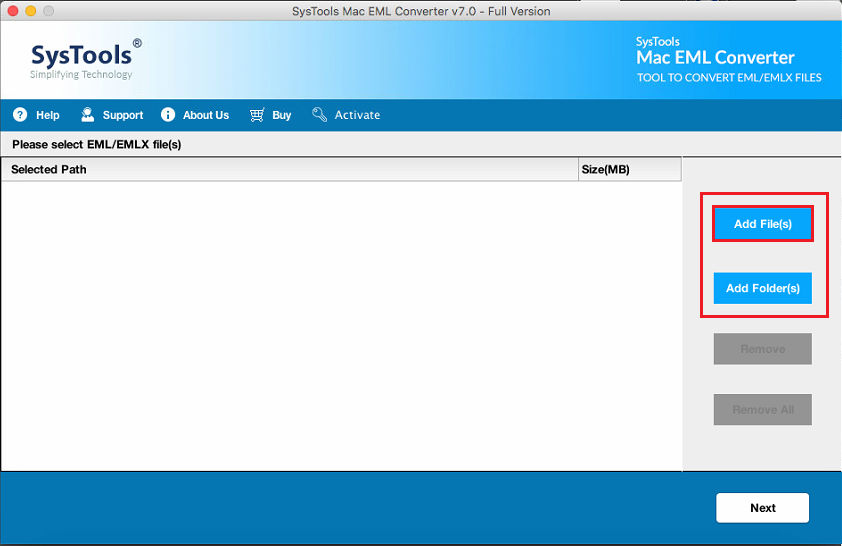
- Add single files or a full folder with Add File(s) and Add Folder(s)
- Accept EML and EMLX files created by any email client
- Keep the folder hierarchy and email properties inside the PST file
- Limit the PST file to a date range with the date filter
- Add EML files of any size with no file size limitation
- Work on macOS 10.8 to 27 (Golden Gate) with Intel and Apple Silicon Macs
Free Demo converts 10 items per folder. The full version costs $39 and comes with a 30 day Refund Policy.
Mac EML to PST Converter Tool to Export EML Files in 5 Steps
Five steps take a Mac folder of EML files to a PST file with the MacWare EML to PST converter software.
Convert EML Files to PST on Mac in One Run
EML to PST converter software builds Outlook data files on the Mac. Add the EML files, select PST as the saving option and follow the steps below.
- Install the software on a Mac and launch it.
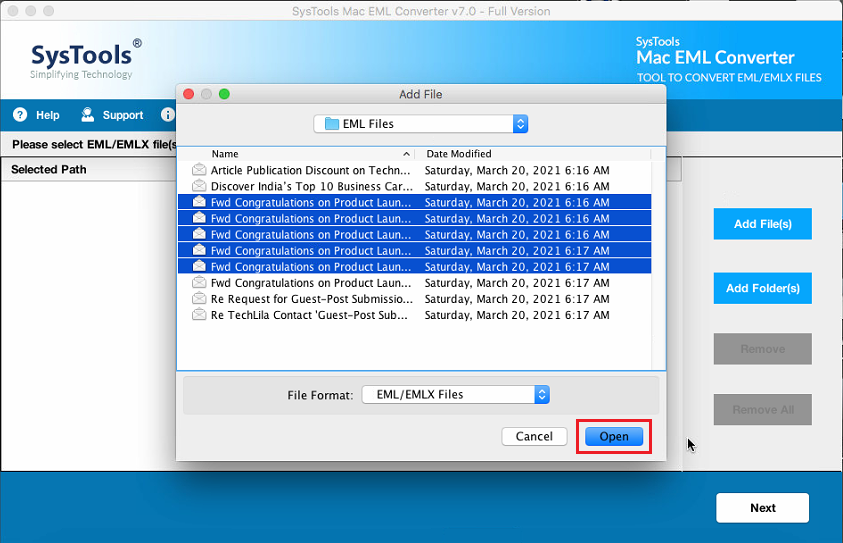
- Click Add File(s) or Add Folder(s) to browse EML or EMLX files.
- Check the email preview and click Next.
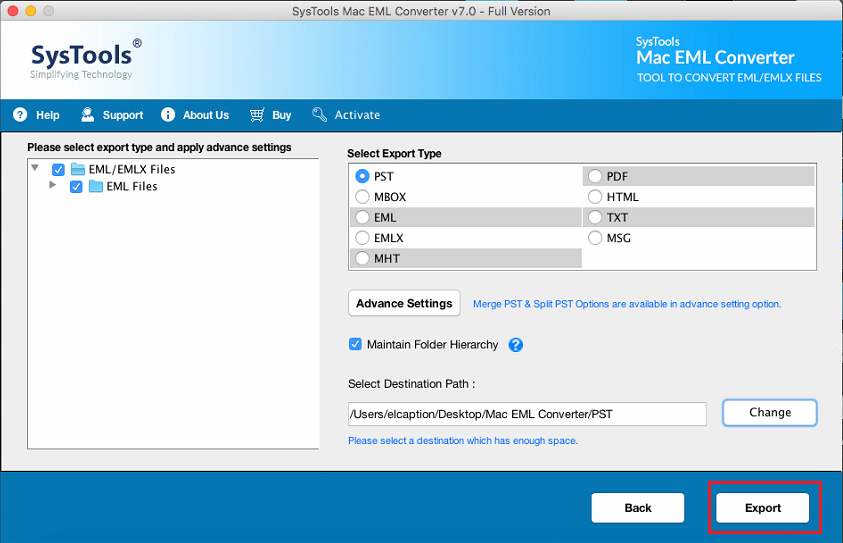
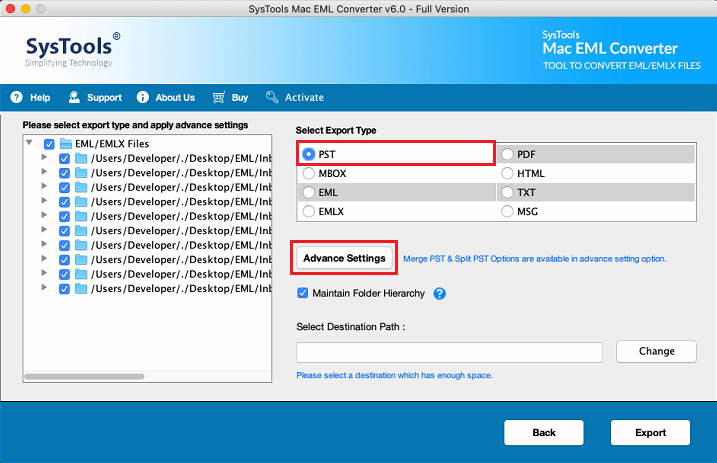
- Select PST as the saving option and set Advance Settings.
- Click Change to set the saving location, then click Export.
EML and EMLX Input Support in Mac EML to PST Conversion
Both file types load through one panel in the Mac EML to PST converter. Thunderbird and Windows Live Mail create EML files, while Apple Mail creates EMLX files.
- Mix EML and EMLX files in one PST job
- Add File(s) selects single files
- Add Folder(s) loads a root folder with its subfolders
- Added files can be of any size
- One run converts a full archive
Advantages of MacWare Mac EML to PST Converter Software
Six more details about how MacWare creates PST files from EML and EMLX files.

Mac EML to PST Single File Output
Create Single PST File saves all converted emails in one Outlook data file. Outlook for Windows opens the data file directly while Outlook for Mac needs the Import option.

Mac EML to PST with Split Option
The Split PST Option lives in Advance Settings. Enable it, set a size in the Split PST After field and a new PST file starts after that size. Outlook 2010 and 2013 limit Unicode PST files to 50 GB by default (per Microsoft).

Mac EML to PST with Attachments
Attachments travel inside the PST file with their emails, and email properties stay intact. Files keep their native formats, so nothing goes missing.

Mac EML to PST Folder Hierarchy
Check Maintain Folder Hierarchy and the source folders appear in the same order inside the PST file.

Mac EML to PST on 15 macOS Versions
The software supports 15 macOS versions, from MacOS X 10.8 Mountain Lion to macOS 27 Golden Gate. The list includes macOS 26 Tahoe, and Apple Silicon M series Macs work next to Intel Macs.

Standalone Mac EML to PST Software
Outlook is not needed to create the PST file. The software runs on its own, so Apple Mail, Thunderbird and Outlook may all be missing from the Mac.
Mac EML to PST Converter Tool for Outlook and Microsoft 365
A PST file made on a Mac opens in Outlook. The route depends on the Outlook version in use.

Mac EML to PST for Windows
Copy the PST file to a Windows PC and open it as an Outlook data file in Outlook for Windows. Old EML mail from a Mac reaches a Windows team this way.
Mac EML to PST for Outlook
Outlook for Mac imports PST files with the Import option. Our guide shows how to Import EML files to Mac Outlook.

Mac EML to PST in Microsoft 365
Microsoft 365 mailboxes receive the data through Outlook. Open the PST file in Outlook for Windows and move the emails across. The software saves to a Mac folder, so the live mailbox is a second step.
Mac EML to PST Conversion Options for Preview, Selection and Size
Settings shape the PST file before export. Bulk loads of EML or EMLX files carry no size limitation.

Batch EML to PST on Mac
Add one file, many files or a root folder and convert the batch in one run.

Complete Email Preview
A preview lists browsed EML files with email details. Unwanted files leave the list before export, so the PST file holds only the needed emails.

Selective EML to PST on Mac
Select the needed emails and convert only those. Unselected emails stay out of the PST file.

Date Filter for Emails
Advance Settings holds a date filter with From and To dates. Only emails sent inside that range reach the PST file, which suits month or year archives.
Single or Split PST Files
Create Single PST File keeps all emails in one file. The Split PST Option starts a new PST file after the size set in the Split PST After field.

No File Size Limit for EML on Mac
The software sets no file size limitation for conversion. Large EML files and big batches convert in one job.
Test Mac EML to PST Converter Free Demo
The free demo converts 10 items per folder. Review the PST output on a Mac first and buy the full version afterwards.
See Mac EML to PST Converter Tool Work on a Mac
The video walks through browsing EML files, selecting the PST option and exporting.
EML, EMLX and PST Formats in Mac EML to PST Conversion
EML holds one message, EMLX one Apple Mail message and PST a full Outlook archive.
EML
An EML file stores one Internet email message as RFC 5322 text with MIME parts. Thunderbird, Apple Mail, Postbox and Windows Live Mail save emails this way. Headers, body and attachments of the email sit in the single .eml file.
EMLX
Inside the Mail library, Apple Mail keeps every message as a separate .emlx file. The file starts with a byte count line, holds the message and ends with an XML property list.
PST
Microsoft Outlook uses the Personal Storage Table file, known as PST. Emails, folders and other mailbox items live together in one PST file. Outlook for Windows opens PST files, while Outlook for Mac uses the Import option.
Quick Facts About Mac EML to PST Converter Software
The last column shows where to check a fact. Details last updated on 07 October 2026.
| Attribute | Value | Where to Verify |
|---|---|---|
| Product | MacWareTools Mac EML to PST Converter, version 9.3, 156.97 MB | System Requirements |
| EML file format | One Internet email message per file, with RFC 5322 syntax, MIME parts and the .eml extension | Sources |
| Input files | EML and EMLX files from any email client, added with Add File(s) or Add Folder(s) | MacWare EML Converter software guide |
| Saving option | PST, one of 9 saving options in the software | MacWare EML Converter software guide |
| PST settings | Create Single PST File and Split PST Option, with the split size set in the Split PST After field | Advance Settings in the software |
| Advance Settings | Date filter (applies to sent date) and Maintain Folder Hierarchy | MacWare EML Converter software guide |
| Supported macOS | macOS 10.8 to 27 (Golden Gate), including macOS 26 (Tahoe), on Intel and Apple Silicon Macs | System Requirements |
| Runtime | Java JDK and JRE 8, 8 GB RAM (8 GB is recommended) and 100 MB free disk space | System Requirements |
| Tested | 10,000 mixed EML and EMLX messages (18.4 GB) on MacBook Pro M3 with macOS 26 on 07 October 2026, with 10,000 messages converted in 31 min 40 sec and 0 failed in PST output | Test Record |
| Free demo | Converts 10 items per folder | Free Demo vs Full Version |
| Price and refund | $39 for the full version with a 30 day refund | Refund Policy |
Mac EML File Sources for EML to PST Conversion
Source apps differ, yet the software accepts every EML file and saves it in PST output.
| Source | How the Mac EML File Is Created | Typical Clue |
|---|---|---|
| Apple Mail | Choose File > Save As > Raw Message Source or drag messages to a Finder folder | Single EML files named after the subject |
| Outlook for Mac | Drag a message to Finder to save it as an EML file | Messages that need a PST file for Outlook for Windows later |
| Thunderbird | Use Save As or Save Message As, or an add-on export for full folders | Big folders of single EML files |
| Webmail | Download the message through Safari, Chrome or Firefox | File sits in Downloads |
| Migration or backup tool | Saves one EML file for every message from an old mailbox | Large batches with folder hierarchy |
EML is not tied to Macs, so an EML file on a Mac may come from any email client. Apple Mail keeps separate .emlx storage files that differ from exported .eml files.
Data Preserved in Mac EML to PST Conversion
Email content, folder structure and meta properties carry into the PST file, so the output matches the source EML files.
Attachments
Embedded files stay attached to their emails inside the PST file.

Email Properties
Internet headers pass through the job unaltered, so sender, recipients and date stay as they were.
Folder Structure
Maintain Folder Hierarchy repeats the source folder structure inside the PST file.

Source Files
Source EML files open in read only mode and stay untouched while the PST file goes to a chosen folder.
What EML Files Keep and Lack in Mac EML to PST Conversion
The limits of EML files set the right goal for a PST job.
What Mac EML Files Do Not Keep Reliably
- Folder hierarchy, unless the export rebuilds the folders
- Read state, flags, categories and labels
- Conversation threads, though Message-ID and References can rebuild them
- SMTP envelope data that sits outside the header
- Bcc recipients, because delivered copies drop them
- File dates from the source computer
What Mac EML to PST Conversion Cannot Create
- A new container never adds authenticity to an email
- A PST file packs many messages while an EML file holds one
- Outlook properties absent from the source EML stay absent in the PST file
- Compare counts, dates, senders, attachments and inline images after the job
- Store the original EML files and record hashes for signed or encrypted mail
Source files open in read only mode, so originals stay untouched. A sample run with the free demo (10 items per folder) checks the output before the full job.
10,000 EML and EMLX Files Tested with Mac EML to PST Converter
Neeraj Singh checked the software with a batch of 10,000 mixed EML and EMLX messages.
| Test Detail | Record |
|---|---|
| Tested by | Neeraj Singh, QA tester |
| Test date | 07 October 2026 |
| Software build | MacWare Mac EML Converter v9.3 |
| Mac hardware | MacBook Pro M3 |
| macOS version | macOS 26 (Tahoe) |
| Test data | 10,000 mixed EML and EMLX messages, 18.4 GB |
| Output tested | PST |
| Result | 10,000 messages converted and 0 failed |
| Conversion time | 31 min 40 sec for 10,000 messages |
| Throughput | 316 messages per minute, about 34.9 GB per hour |
| Peak memory | 2.6 GB RAM |
| Largest tested message | 275 MB |
| Largest attachment | 250 MB |
| Checks | Message count, folder hierarchy and sampled attachments |
All 10,000 messages finished in 31 min 40 sec with zero conversion failures, and peak memory stayed at 2.6 GB RAM. Folder hierarchy and sampled attachments were checked in the PST output. Time varies with the Mac, the file sizes and the attachments.
Manual Methods vs Mac EML to PST Converter Software
Manual methods suit a few files only. Bulk jobs need software.
| Task | Manual Method | Mac EML to PST Converter |
|---|---|---|
| Number of files | A few files per move | Many files in one batch |
| Output | Messages dragged into Outlook one group at a time | One PST file, or several with the Split PST Option |
| Email client | Needs Outlook installed | Standalone, no email client needed |
| Date range | Sort emails into date folders by hand | Built in date filter |
| Attachments | Check attachments after every move | Kept with every email |
| Folder structure | Rebuild folders by hand | Kept with Maintain Folder Hierarchy |
Real Use Cases for Mac EML to PST Converter Tool
Four groups that need EML to PST converter software on a Mac.
Mac to Windows Movers
Users who move from a Mac to a Windows PC carry old EML mail along. Convert the EML folder on the Mac with PST output, copy the PST file across and open it in Outlook for Windows.
Outlook Users
Outlook has no option to import a folder of EML files. PST is the data file Outlook opens, so PST output removes the dragging.

Teams That Archive Email
An audit or an internal review needs a single archive. Convert EML files on Mac with PST output, keep attachments and folders and store the archive in one place.
IT Admins Moving Mailboxes
IT admins move many users to Outlook. Load the EML folders through Add Folder(s), set the Split PST Option for a size cap and finish the job in one run.
Reasons to Use Mac EML to PST Converter Software
Mac users create PST files from EML files for three common reasons.
Mac EML Files for Windows Outlook
Outlook for Windows opens PST files, so a folder of loose EML files must become one data file first. The software builds that file on the Mac.
- Skip the dragging when bulk EML files go into Outlook
- Merge many EML files into one Outlook data file
- Keep source folders with Maintain Folder Hierarchy
- Carry old EML mail from a Mac to a Windows PC
- Build an archive for admins and legal teams
Mac EML Files for Mac Outlook
Outlook for Mac imports PST files with the Import option. One PST file replaces thousands of loose EML files.
- Import old Thunderbird or Apple Mail messages into Outlook for Mac
- Replace thousands of files with one archive
- Convert only a date range with the date filter
- Split a large archive into several PST files with the Split PST Option
Mac EML Files for Microsoft 365
Microsoft 365 users open PST files in Outlook and move the data into the mailbox from there.
- Stage Mac EML data for a Microsoft 365 move through Outlook
- Move mail from Zoho, Apple Mail or Thunderbird exports
- Retain the source EML files until Outlook lists all emails
- Test a sample PST file with the free demo first
Checklist Before Running Mac EML to PST Converter Tool
Complete these eight tasks before clicking Export.
- Collect the EML and EMLX files in one folder.
- Confirm the files are true EML files and not renamed EMLX files.
- Store a copy of the originals before conversion.
- Keep the source folder on the Mac itself, not on a network drive.
- Install Java JDK and JRE 8 on the Mac when missing.
- Run the free demo and compare 10 converted items per folder.
- Select a saving location with free space for the PST file.
- Set the date filter or the Split PST Option in Advance Settings.
System Requirements for Mac EML to PST Converter Software
The software needs 100 MB of disk space, 8 GB of RAM and Java 8.
Trial Limitations
Limitations
The free demo version converts 10 items per folder.
System Specifications
Hard Disk Space
100 MB of free hard disk space required
RAM
8 GB RAM (8 GB is recommended)
Intel Mac (Pre-M1): DDR3, DDR4, LPDDR3, LPDDR4X
Apple Silicon (M1 & newer): LPDDR5, LPDDR5X
Architecture: Fully optimized for Unified Memory Architecture (UMA)
Processor
Intel Mac (Pre-M1): Core™ i5, i7, or i9 (Minimum 8-core processor recommended)
Apple Silicon (M1 & newer): Apple M1, M2, M3, M4, or M5 series (Base, Pro, Max, or Ultra architectures)
Supported Devices: MacBook Air, MacBook Pro, iMac, Mac mini, Mac Studio
Prerequisites
Install Java JDK & JRE 8 on the Mac before launching the software.
Operating System
MacOS X 10.8 (Mountain Lion), MacOS X 10.9 (Mavericks), MacOS X 10.10 (Yosemite), MacOS X 10.11 (El Capitan), MacOS X 10.12 (Sierra), MacOS X 10.13 (High Sierra), MacOS X 10.14 (Mojave), MacOS X 10.15 (Catalina), MacOS X 11.0 (Big Sur), MacOS X 12.0 (Monterey), MacOS X 13.0 (Ventura), MacOS X 14.0 (Sonoma), MacOS X 15.0 (Sequoia), MacOS 26 (Tahoe), MacOS 27 (Golden Gate) and above versions.
Updated on 07 October 2026
Free Demo vs Full Version of Mac EML to PST Converter Tool
The two versions have the same features. Only the item count differs.
| Features | Free Version | Full Version |
|---|---|---|
| Add EML and EMLX Files in Batch | ||
| Preview Emails with Attachments | ||
| Single PST File or Split PST Option | ||
| Date Filter for Exporting Selected Data | ||
| Works on macOS 10.8 to 27 (Golden Gate) | ||
| Convert EML and EMLX to PST | 10 Items/ Folder | All Items |
| Cost | FREE | $39 |
The full version has a 30 day refund. Conditions sit in the Refund Policy.
Mac EML to PST Converter Tool Questions and Answers
Answers on PST output, Outlook, split PST files, macOS support, the free demo and refunds.
A PST file is a Personal Storage Table file from Microsoft Outlook. The file keeps emails, folders and other mailbox items together. Outlook for Windows opens PST files directly, and Outlook for Mac brings them in through the Import option.
Click Add Folder(s) and browse the root folder that holds all the EML files, then click Next. Select PST as the saving option, click Change to set the saving location and click Export. One run converts every added file, and View Report opens the destination folder.
Yes. EML files, EMLX files or a mix of both load into the same job. Use Add File(s) for single files or Add Folder(s) for a full folder.
No. The software runs on its own, so Outlook, Apple Mail and Thunderbird may all be missing from the Mac. Java JDK and JRE 8 must be installed. Outlook is needed only to open the PST file later.
Yes. Choose PST as the output format, then enable the Split PST Option in Advance Settings. Enter a size in the Split PST After field and a new PST file starts after that size. Create Single PST File keeps everything in one file instead.
Yes. Create Single PST File saves all converted emails in one PST file. With Maintain Folder Hierarchy checked in Advance Settings, the PST file keeps the source folder structure.
Yes. Embedded attachments stay with their emails in the PST file, and email properties including sender, recipients and date stay intact. Delivered EML files normally carry no Bcc recipients, so the PST file cannot show them.
Yes. Enable the date filter in Advance Settings and enter a From and a To date. Emails sent outside that window are skipped.
The software supports 15 macOS versions, from MacOS X 10.8 (Mountain Lion) to macOS 27 (Golden Gate). That includes macOS 26 (Tahoe) and MacOS X 15.0 (Sequoia). Both Intel Macs and Apple Silicon M series Macs run the software.
No. Added EML files face no file size limitation, so large files and big batches convert in one run. The largest message in testing was 275 MB.
Yes. Neeraj Singh ran the software on a MacBook Pro M3 with macOS 26 and a batch of 10,000 mixed EML and EMLX messages (18.4 GB). The PST job took 31 min 40 sec at 316 messages per minute with zero failures. Folder hierarchy and sampled attachments were checked.
The test batch of 10,000 messages (18.4 GB) finished in 31 min 40 sec on a MacBook Pro M3 with macOS 26. The time depends on the Mac, the file sizes and the attachments, so the free demo helps to check the speed on real data.
Click Add Folder(s), browse to the root folder of the EML files, select PST as the output and click Export. One run builds the PST output, so no message needs dragging.
Add the external drive folder on the Mac, select PST as the saving option and click Export. Move the PST file to the Windows PC and open it as an Outlook data file. Keep the originals on the drive until Outlook lists all emails.
Outlook for Mac imports PST files with the Import option. Open Outlook for Mac, start the import and select the PST file created by the software.
Run the EML job with PST output on the Mac, open the PST file in Outlook for Windows and move the data into the Microsoft 365 mailbox there. The software saves to a folder on the Mac, so the live mailbox step comes after.
No. The PST file is created on the Mac under macOS 10.8 to 27. Windows enters only when Outlook for Windows opens the PST file, and Outlook for Mac can import it instead.
Yes. EML is a standard format, so EML files from any desktop email client or webmail service convert on a Mac. EMLX files from Apple Mail work too.
Besides PST, the software saves EML and EMLX files on Mac as EML, EMLX, MBOX, MSG, HTML, TXT, PDF and MHT. The Mac EML Converter page covers all formats.
Keep the source files on the Mac itself, because a NAS, SAN, network or shared drive source can stop the output from being created. Where an anti-virus program blocks the export, allow the software in the anti-virus settings.
Java JDK and JRE 8 are prerequisites. Without Java, the software reports that it cannot load the Java Runtime Environment. Install JDK and JRE 8 and launch the software again.
Yes. Keep the source EML files, and for signed, encrypted or legal mail record a SHA-256 hash first. The software opens EML files in read only mode, so the source folder is not modified.
Yes. The free demo converts 10 items per folder, which is enough to test the PST output. Check counts, dates, subjects, senders, recipients, attachments and inline images in the demo output before buying the full version for $39.
Delivery is electronic. An email with the download link and the activation key arrives after payment confirmation.
Yes. A refund can be requested within 30 days of purchase. The conditions, including the signed Letter of Destruction sent by email, are listed in the Refund Policy.
Sources for Mac EML to PST Conversion Facts
These primary sources back the format and platform facts above.
- EML message syntax: Internet Message Format (RFC 5322)
- PST size limit: File size limits of .pst and .ost files are larger
- Outlook for Mac import: Import email messages into legacy Outlook for Mac
- Software steps and options: MacWare EML Converter software guide
- Refund conditions: Refund Policy
Customer Reviews of Mac EML to PST Converter Tool
Verified Customer Reviews After Using Full Version on Mac OS
"Andreas from support team healped me in exporting bulk of EML files in PST format on my Macbook air."

Monica
California
"Its easy to use GUI helped me to carryout the conversion process on my own. Best buy and price worthy."

Rachel
Brampton
"5 star rating to this EML to PST converter and Sukanya Pawal support person. It was quite easy to use this software."
Denial
USA
Mac EML to PST Converter Software in Short
- Mac EML to PST conversion creates PST files from EML and EMLX files in bulk
- PST output keeps attachments and folder structure
- Create Single PST File or use the Split PST Option with a set size
- Outlook is not needed to create the PST file, only Java JDK and JRE 8 on the Mac
- Works on macOS 10.8 to 27 with Intel and Apple Silicon Macs
- Tested on 10,000 mixed EML and EMLX messages in 31 min 40 sec with 0 failures in PST output
- Free demo with 10 items per folder and a $39 full version
Convert EML to PST on Mac in Bulk with the Free Demo
- PST output for EML and EMLX files on Mac in bulk
- Attachments, email properties and folder structure stay intact
- Support for macOS 10.8 to 27 (Golden Gate) on Intel and Apple Silicon Macs
- Free demo with a 10 item per folder limit
- Full version for $39 with a 30 day refund
Check the PST output on real EML files before purchasing.